A pixel mascot under your prompt.
It reacts to what Claude is doing: working, waiting, failing, finishing. Beside it, a status bar with your model, context, plan limits and Git state. Sounds are off until you turn them on.
/plugin install awesome-hud --marketplace cosmos-127/awesome-hud
claude plugin install awesome-hud --marketplace cosmos-127/awesome-hud
- 7 themes
- optional sounds
- no telemetry
- MIT
❯ /awesome-hud cat» loafing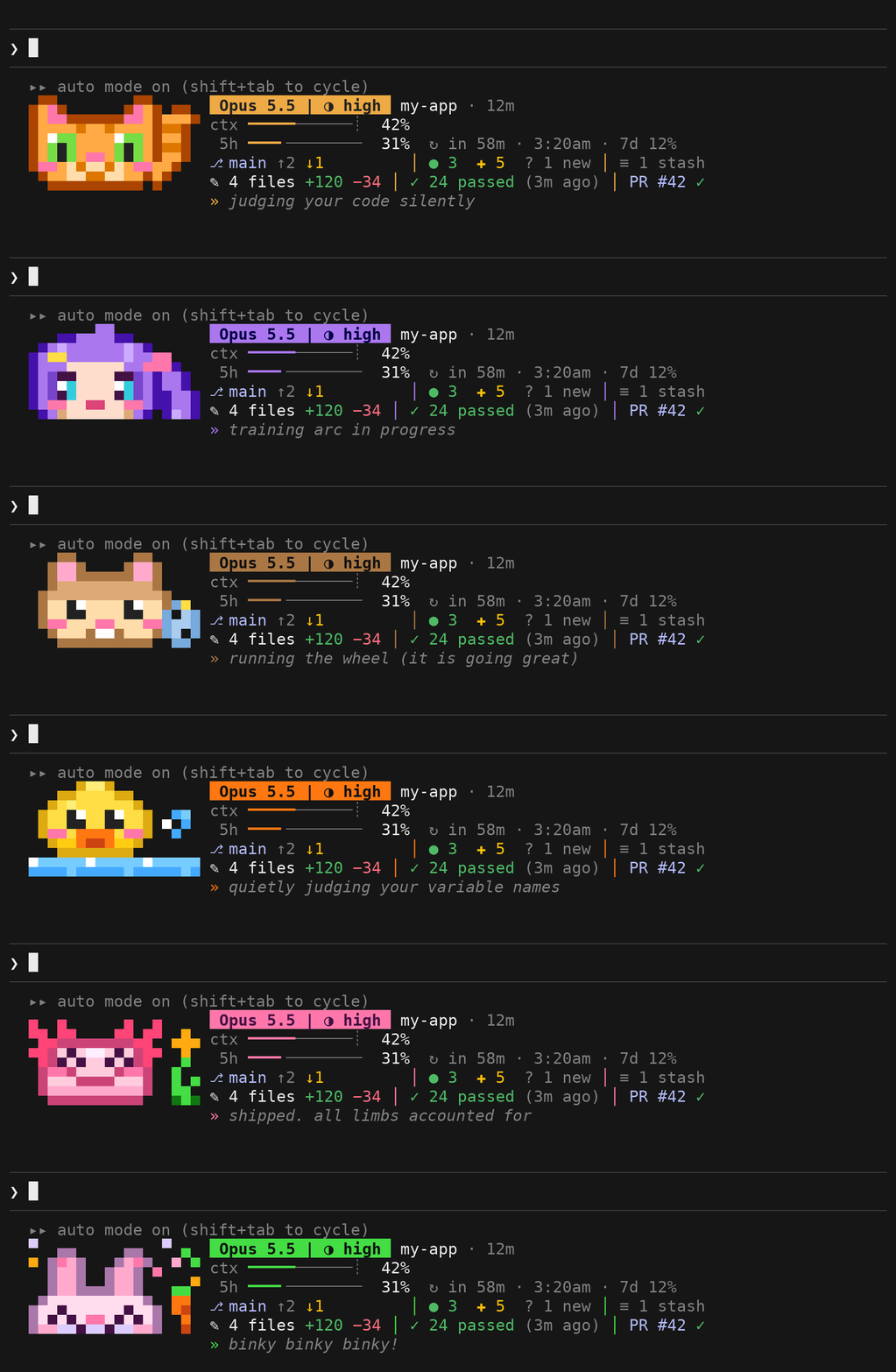
Seven themes
Each has its own mascot, mood animations, spinner words and optional sounds. Pick one, then a mood to see it act.

Switching themes in Claude Code briefly shows a larger version of the mascot. The creeper theme is fan art of a character from a video game and is not affiliated with or endorsed by Mojang or Microsoft. Artwork is drawn pixel by pixel; sounds are generated by a script in the repository.
A bar that earns its rows
Five rows beside the mascot. When space is limited, the less important details are hidden.
Opus 5.5 | ◑ high my-app · 12m
ctx ━━━━━━━╌╌╌╌╌╌╌╌╌ 42%
 5h ━━━━━╌╌╌╌╌╌╌╌╌╌╌ 31% ↻ in 58m · 3:20am · 7d 12%
⎇ main ↑2 ↓1       │ ● 3 ✚ 5 ? 1 new │ ≡ 1 stash
✎ 4 files +120 −34 │ ✓ 24 passed (3m ago) │ PR #42 ✓
» loafing
- Model, effort, project folder (and worktree), session time, and cost.
- Context usage and the auto-compact threshold. From 70% full, what takes the most of it.
- Five-hour and weekly plan usage, with the reset time.
- Git state, session edits, test results, and pull request status.
- A status line with the current file or command. At rest, what needs you: failing tests, a stopped rebase or merge, or agents that failed or are still at work.
| Part | Meaning |
|---|---|
⎇ main | Current branch; shows rebase or merge progress when applicable. |
↑2 ↓1 | Commits ahead of and behind the upstream branch. |
● 3 ✚ 5 ? 1 new | Staged, changed, and untracked files. A clean tree shows ✓ clean; conflicts are highlighted. |
≡ 1 stash | Number of Git stashes. |
✎ 4 files +120 −34 | Files Claude edited this session and lines added or removed. |
✓ 24 passed (3m ago) | Latest test result and age; marked stale after a later edit. A repeat run that still fails says what it failed before. |
PR #42 | Pull request for this branch; checks and review appear with PR status enabled. |
Narrow or short terminals, and Layout compact, show two lines without the mascot. Position above moves the HUD above the prompt. If a mark draws as a box, set Symbols to ascii.
Install
Run either command above, then start a new session, or run /reload-plugins in an open one. The HUD appears below the prompt.
It runs in terminal sessions, not in the Claude Code desktop app. It needs Claude Code 2.1.287 or later (it is tested on 2.1.308), and it uses Claude Code's early-access mods API, which may change.
To update, run claude plugin marketplace update awesome-hud, then claude plugin update awesome-hud@awesome-hud, and restart or run /reload-plugins. Or turn on auto-update for this marketplace in the Marketplaces tab of /plugin.
Using it
/awesome-hudLists the themes./awesome-hud bunnySwitches to a theme and saves your choice./awesome-hud filesShows this session's edits, Git state, commits, and pull request.pspspsType it to summon the mascot. The text is still sent to Claude./configChanges the settings below./pluginDisable the plugin here to turn the HUD off for a while.
Settings
Configure the HUD in /config.
| Setting | Default | Description |
|---|---|---|
| Theme | cat | cat, chibi, creeper, hamster, duck, axolotl, or bunny. |
| Position | below | Show the HUD below or above the prompt. |
| Layout | full | Show the mascot and stats, or use compact for stats only. |
| Symbols | auto | Detect Unicode support, or choose unicode or ascii. |
| Sounds | off | Play theme sounds on errors, permission requests and questions, parties, and turns that last at least 30 seconds. |
| Session cost | auto | Show cost when billed per token; hide it on Pro or Max plans. |
| Themed words | on | Use theme text in the spinner, turn summary, and event toasts. |
| PR status | off | Use gh pr view to show pull request checks and review. This is the only feature that uses the network. |
Sounds play through Claude Code on macOS, through PowerShell on Windows, and on Linux through pw-play, paplay, or aplay.
Privacy
A mod runs inside Claude Code with your permissions and is not sandboxed. This is what awesome-hud does with that.
It watches the session, draws the HUD, and plays optional sounds. It never rewrites a prompt, a tool call, or a permission decision.
It sends nothing anywhere unless PR status is on, and then only through gh, with your own GitHub sign-in.
It writes one setting, awesome-hud.theme, when you pick a theme. There is no telemetry.
It runs git in your repository and, with Sounds on, a local audio player. It never uses a shell.
The full list of what it runs, reads and writes is in the README. To report a vulnerability, see SECURITY.md.
Make a theme
A theme is a file in hooks/themes/ and four WAV files. Draw an 18 × 10 sprite, define eight moods, add the words, register it, run claude plugin test ., then python3 scripts/site.py to put it on this page.